Curriculum topics / modules
Explore the supplied young innovators / ev3 robotics learning sequence.

YOUNG INNOVATORS / EV3 ROBOTICS / GRADES 7–9
Build a mechanism. Code a response. Explain what changed.
Grades 7–9 / 90 learning hours.
A 90-hour TECHNOVA robotics course for Grades 7–9 using the available LEGO MINDSTORMS EV3 31313 classroom kit. Build stable mechanisms, programme controlled motor movement and combine touch, colour and infrared sensing in supervised challenges. Develop reusable block-code routines, compare calibrated feedback and refine one integrated robot through repeatable testing, debugging and a documented demonstration.
Classroom kit available at TECHNOVA. Confirm learner readiness, software compatibility, kit-sharing arrangements, batch dates and fees before booking.

PLAN AHEAD
Course fee / 90 hours₹14,999 + 18% tax
Total including tax₹17,698.82
Regular, weekend and Sunday batches available. Monday–Saturday: preferred slots 9am–6pm; Sunday: 10am–1pm (IST). Slots, dates and places require availability confirmation.
Fees exclude 18% tax; totals include tax. Confirm material, licence and take-home kit charges before enrolment. Enquiry is not a reservation.
LEGO MINDSTORMS EV3 ROBOTICS / AT A GLANCE
Explore the supplied young innovators / ev3 robotics learning sequence.
Session frequency and calendar duration are confirmed by enquiry.
Three project ideas; choose one integrated project within the 90 hours, not three additional projects.
01 / COURSE PERSPECTIVE
No previous robotics coding is required. Learners should be comfortable following a build sequence, measuring distances and working in a small team. The manufacturer recommends ages 10+ for set 31313; a grade label does not replace that age guidance. A mentor and parent confirm age, readiness and supervision before placement.
Discuss preparation and readiness with a mentor before choosing a batch. These are recommended starting points, not a guarantee of placement.
Build a stable drive base, control measured motor movement and turns, read each supplied sensor, organise reusable routines with variables and conditions, calibrate feedback, diagnose faults systematically, and present a robot's repeated test results and evidence-based improvements.
Project scope depends on supervision, equipment and practice. Examples describe learning activities, not verified student work or guaranteed outcomes.
02 / WHAT YOU WILL WORK ON
Use bracing, axles and gearing to support predictable low-speed movement.
Use the retail kit's touch, colour and infrared sensors with loops and decisions.
Keep calibration and trial records, isolate faults and communicate a justified improvement.
03 / CURRICULUM & PRACTICE
10 modules total exactly 90 learning hours, including exercises, 14 hours for one integrated project and 4 hours for demonstration and review. Calendar duration depends on session frequency; project time is not added twice.
| Module | Content | Hours |
|---|---|---|
| 1 | Kit Orientation, Safety & Team Roles | 4 |
| 2 | Structures, Gears & Stable Mechanisms | 10 |
| 3 | EV3 Workspace & First Programmes | 8 |
| 4 | Drive Base Movement & Turning | 12 |
| 5 | Touch & Colour Sensor Investigations | 10 |
| 6 | Infrared Sensing & Beacon Control | 8 |
| 7 | Loops, Variables, Reusable Logic & Debugging | 10 |
| 8 | Line Following & Mechanism Challenges | 10 |
| 9 | Integrated Robot Project & Test Evidence | 14 |
| 10 | Demonstration, Reflection & Assessment | 4 |
| Total | 90 | |
A TECHNOVA mentor reviews the following suggested rubric during the included final review. This is course feedback, not an accredited LEGO qualification or a guaranteed certificate.
Total: 100%. Portfolio evidence includes the programme file, a build/port map, calibration notes, a test log and one justified improvement.
04 / APPLICATION STUDIO
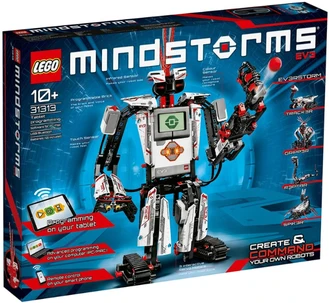
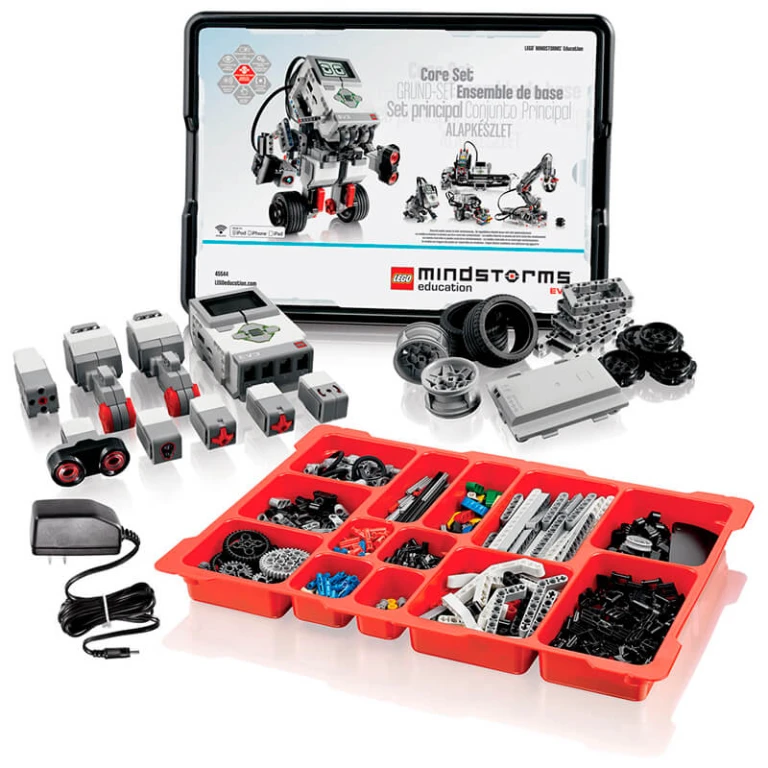
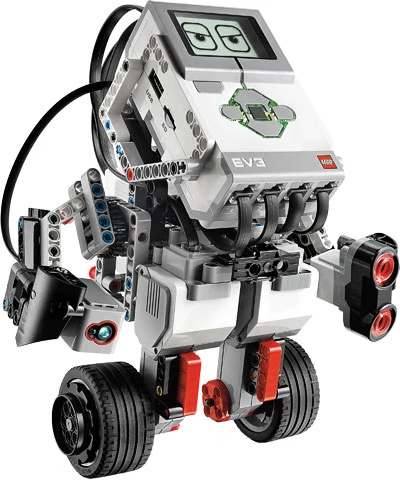
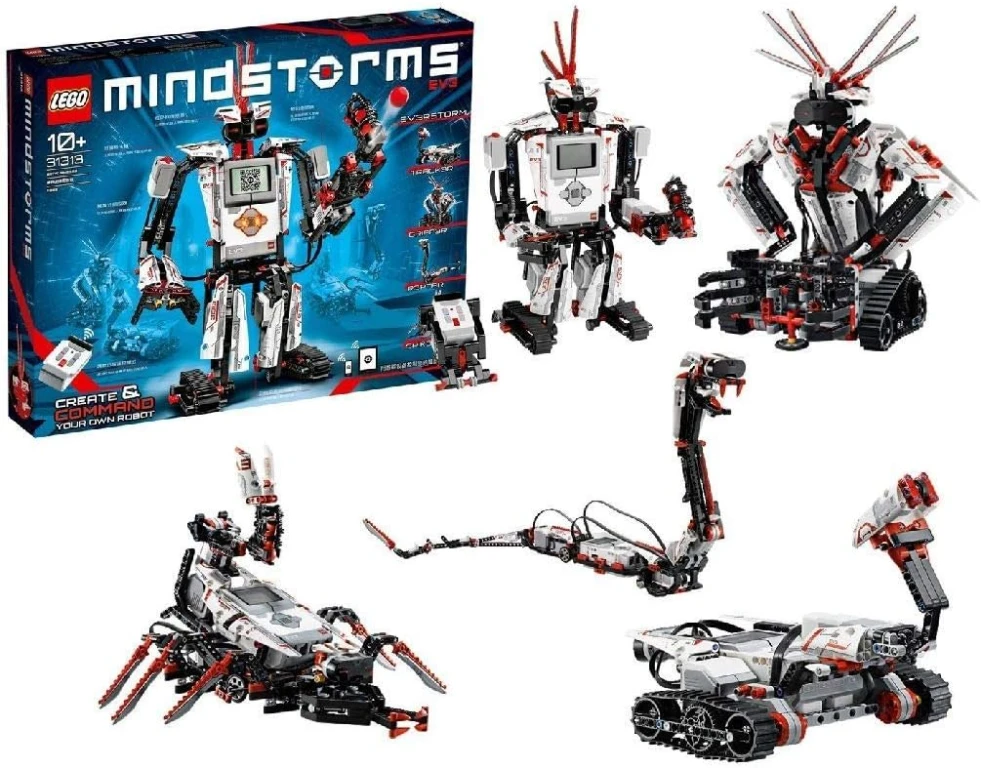
Choose one bounded brief from the three project directions for the included 14-hour integrated project. The four supplied EV3 photographs below show kit and build references, not exact illustrations of these briefs, guaranteed kit inventory or verified TECHNOVA student work.
View official LEGO EV3 31313 building references
The gallery uses photos supplied by the site owner, not images scraped from LEGO's website. Set 31313 is the 601-element retail kit; Education Core Set 45544 is shown separately for comparison only. The project briefs describe independent TECHNOVA learning activities, not the pictured manufacturer's builds.
Kit & build references / hover or focus to pause. Swipe or scroll when motion is reduced.
YOUNG INNOVATORS / EV3 ROBOTICS
Build a stable drive base and navigate a short measured path.
Evidence to discuss: Compare predicted and observed travel and turning error.
YOUNG INNOVATORS / EV3 ROBOTICS
Use colour-sensor feedback and a safe stop to follow a marked route.
Evidence to discuss: Explain calibration, lighting effects and repeated trial results.
YOUNG INNOVATORS / EV3 ROBOTICS
Combine a bumper or infrared threshold with bounded low-speed motion.
Evidence to discuss: Show a decision trace and describe sensing limitations.
YOUNG INNOVATORS / EV3 ROBOTICS / PROJECT WORKFLOW
Scroll to follow the journey. On a smaller screen, swipe the cards or use your keyboard.
Choose the mechanism and agree a safe test area.
Map ports and connect one input to one action.
Repeat the same test and record what actually happens.
Use evidence to justify one build or programme change.
YOUNG INNOVATORS / EV3 ROBOTICS / INTERACTIVE CONCEPT
Explore a generic robot's structure, controller and motion layers. This is an original teaching illustration, not a 31313 assembly instruction, software emulator or exact LEGO kit model.
This illustrative 3D model is not a hardware specification, a functional simulation, a fabrication file or equipment promised with enrolment.
Explore a generic robot's structure, controller and motion layers. This is an original teaching illustration, not a 31313 assembly instruction, software emulator or exact LEGO kit model. Interactive rotation and layer separation require JavaScript and WebGL.
Drag to rotate. On desktop, scroll to separate the layers, or use the controls.
05 / TOOLS & RESPONSIBLE PRACTICE
TECHNOVA has the EV3 31313 kit available for classroom practice: 601 building elements, the programmable EV3 Brick, two large motors, one medium motor, a touch sensor, a colour sensor and an infrared sensor with beacon. Set 31313 is the retail kit, not the Education Core Set 45544; ultrasonic and standalone gyro sensors are not assumed to be included. Classroom use does not include a take-home kit.
The named classroom kit is available. Confirm learner-to-kit allocation, devices, consumables, software and supervised lab access with TECHNOVA. Classroom practice does not include personal ownership or a take-home kit.
Use supervised tabletop or floor-level robots in a clear test area. Keep fingers, hair and clothing away from gears and wheels; stop the motors before rebuilding. Follow the manufacturer age and battery guidance. Infrared proximity values are not precision distance measurements. No mains circuits, projectile mechanisms or unsupervised installation of unsupported software are part of the course.
EV3 is a retired platform. LEGO provides EV3 Lab software as-is without maintenance, security patches or technical support. Before a batch starts, the mentor must confirm a tested EV3-compatible programming environment, operating system, firmware and USB/Bluetooth connection. Families should not purchase or install legacy software solely on the basis of this page.
LEGO, MINDSTORMS and SPIKE are trademarks of the LEGO Group. This is an independently designed TECHNOVA course; it is not affiliated with, sponsored by or certified by the LEGO Group. The syllabus and conceptual illustrations are original TECHNOVA teaching content; supplied reference photographs retain their respective owners' rights.
06 / BEFORE YOU JOIN
No previous robotics coding is required. Learners should be comfortable following a build sequence, measuring distances and working in a small team. The manufacturer recommends ages 10+ for set 31313; a grade label does not replace that age guidance. A mentor and parent confirm age, readiness and supervision before placement.
A 90-hour TECHNOVA robotics course for Grades 7–9 using the available LEGO MINDSTORMS EV3 31313 classroom kit. Build stable mechanisms, programme controlled motor movement and combine touch, colour and infrared sensing in supervised challenges. Develop reusable block-code routines, compare calibrated feedback and refine one integrated robot through repeatable testing, debugging and a documented demonstration.
TECHNOVA has the EV3 31313 kit available for classroom practice: 601 building elements, the programmable EV3 Brick, two large motors, one medium motor, a touch sensor, a colour sensor and an infrared sensor with beacon. Set 31313 is the retail kit, not the Education Core Set 45544; ultrasonic and standalone gyro sensors are not assumed to be included. Classroom use does not include a take-home kit. Please confirm the learner-to-kit ratio and supported classroom devices before enrolment.
The 10 modules total 90 learning hours, including a 14-hour integrated project and 4-hour final review. Session frequency determines calendar duration; exercises and project time are already included.
EV3 is a retired platform. LEGO provides EV3 Lab software as-is without maintenance, security patches or technical support. Before a batch starts, the mentor must confirm a tested EV3-compatible programming environment, operating system, firmware and USB/Bluetooth connection. Families should not purchase or install legacy software solely on the basis of this page.
Safe build operation, programme logic, calibration and test evidence, plus explanation and teamwork. The suggested rubric totals 100%; this is mentor feedback, not an accredited LEGO qualification or a guarantee of certification.
Enquire with the learner's grade, age and current experience. Confirm readiness, available batches, fees, delivery mode, device/software compatibility and supervised kit access. An enquiry is not a confirmed booking.
START WITH A COURSE CONVERSATION
Share your current experience and project goals. Confirm readiness, availability, fees, tools and class arrangements with TECHNOVA.